 Logic Nerds
Win/Loss & Velocity
Why you win, why you lose, and how long deals take to get there.
7 team reports, 2 Rep-Level Personal reports, 1 dashboard and an action guide.
Uses no flows.
Or get all four packs for $89. Professional Edition and up.
What it answers
- What's our win rate by rep, by lead source and by deal type?
- Why are we losing deals?
- How long does a deal take to close, and how big is the average win?
- Where do deals move forward, stall or drop out between stages?
Reports included
7 team reports for managers and 2 Rep-Level Personal reports that show each team member only their own records.
| Report | What it shows | For |
|---|---|---|
| Win Rate by Rep | Win rate for each rep on deals closed in the last 12 months. | Team |
| Win Rate by Source | Win rate by lead source, last 12 months. | Team |
| Win Rate by Type | Win rate by opportunity type, last 12 months. | Team |
| Loss Reasons | Lost deals in the last 12 months, by loss reason and rep. | Team |
| Average Sales Cycle | Average days from created to won, by rep and type, last 12 months. | Team |
| Average Deal Size | Average won deal size by fiscal quarter and type, last 12 months. | Team |
| Stage Exits | Every stage change in the last 90 days, from stage to stage. Shows where deals advance, stall, go backward or drop out. | Team |
| My Won Deals This Quarter | Each rep's own wins this fiscal quarter. | Rep-Level Personal |
| My Losses This Quarter | Each rep's own losses this fiscal quarter, with the loss reason. | Rep-Level Personal |
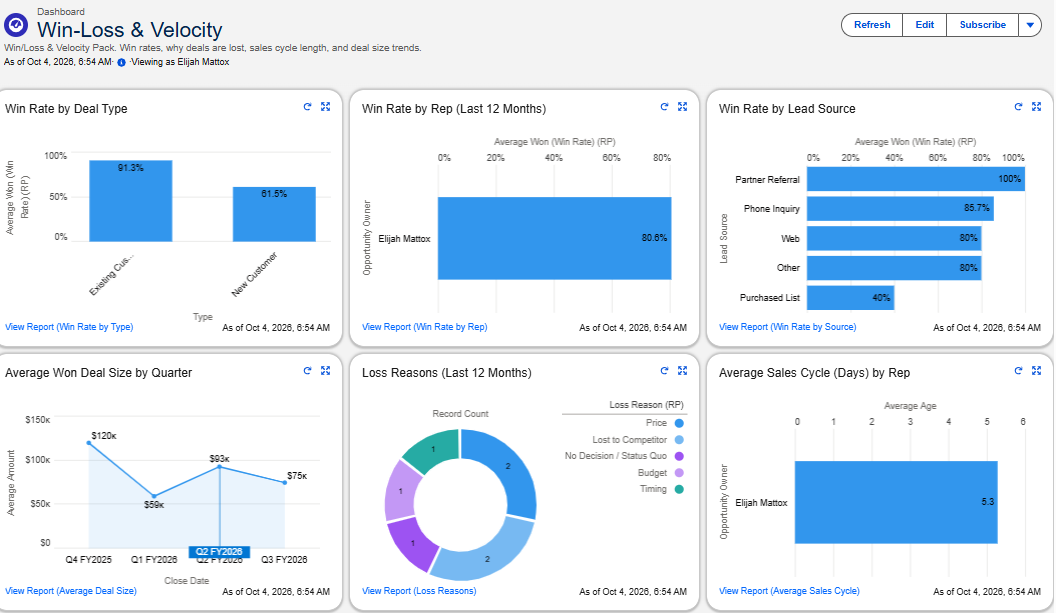
Dashboard
Win rates, why deals are lost, sales cycle length and deal size trends.
Behind the scenes
- Calculates win rate automatically, by rep, by source or by deal type.
- Makes sure every lost deal comes with a reason, so your loss data is worth reading.
Everything the pack adds is labeled so it can't collide with what's already in your org, and any of it can be switched off.
Easy to adjust
- Loss reasons can be edited to match what your team actually hears.
Requirements
- Salesforce Professional Edition or higher
- A user with permission to install packages (usually System Administrator)
- No flows. This pack doesn’t count against your flow limits.
- About 30 minutes to install and set up
Read the install guide before you buy if you want to see exactly what's involved.
Other packs
Pipeline Health · Leads & Top of Funnel · Accounts & Activity. Or get all four for $89.
Need reporting built around your own process? Custom builds start at $499.